Sections
Sections are one of the most powerful tools for structuring projects inside Instagantt, allowing you to group tasks, define phases, and organize work in a way that mirrors how real project management works. Whether you're managing sprints, client deliverables, or internal workflows, Sections bring clarity, control, and scalability to your online Gantt chart planning.
Understanding how to use Sections strategically can dramatically improve planning accuracy, team collaboration, and overall project visibility.
🧭 Table of Contents
- What Are Sections and Why They Matter for Project Management
- How Sections Help You Organize Tasks in Your Gantt Chart
- How to Create Sections in Instagantt
- How to Move and Reorder Sections
- Who Can Create and Manage Sections
- Managing Sections Safely: Editing, Deleting, and Task Impact
- Best Practices for Using Sections in Project Planning
- Summary
- Frequently Asked Questions (FAQ)
📚 What Are Sections and Why They Matter for Project Management
Sections are structural dividers inside a project that group related tasks into meaningful blocks. Instead of working with one long task list, Sections allow you to break your Gantt chart into logical, easy-to-read segments.
From a project management perspective, Sections help you:
- Structure complex timelines into clear phases
- Improve task visibility and workflow organization
- Reduce cognitive overload for large project plans
- Align work with team responsibilities
- Make your online Gantt chart easier to read and manage
Every new blank project in Instagantt automatically includes at least one default section (Section 1), ensuring that all projects start with a structured foundation. Templates and pre-built projects usually include multiple predefined sections based on best practices.
🧱 How Sections Help You Organize Tasks in Your Gantt Chart
Sections are flexible and adapt to almost any project structure. Here are some of the most effective real-world use cases:
- Project Phases: Planning → Execution → Review → Delivery
- Agile Sprints: Sprint 1, Sprint 2, Sprint 3
- Client-Based Work: Client A, Client B, Client C
- Operational Workflows: Design, Development, QA, Deployment
- Individual Cases: One Section per case, request, or initiative
By aligning Sections with how your organization actually works, you turn your Gantt chart software into a true project control system, not just a visual timeline.
➕ How to Create Sections in Instagantt
To create a new Section:
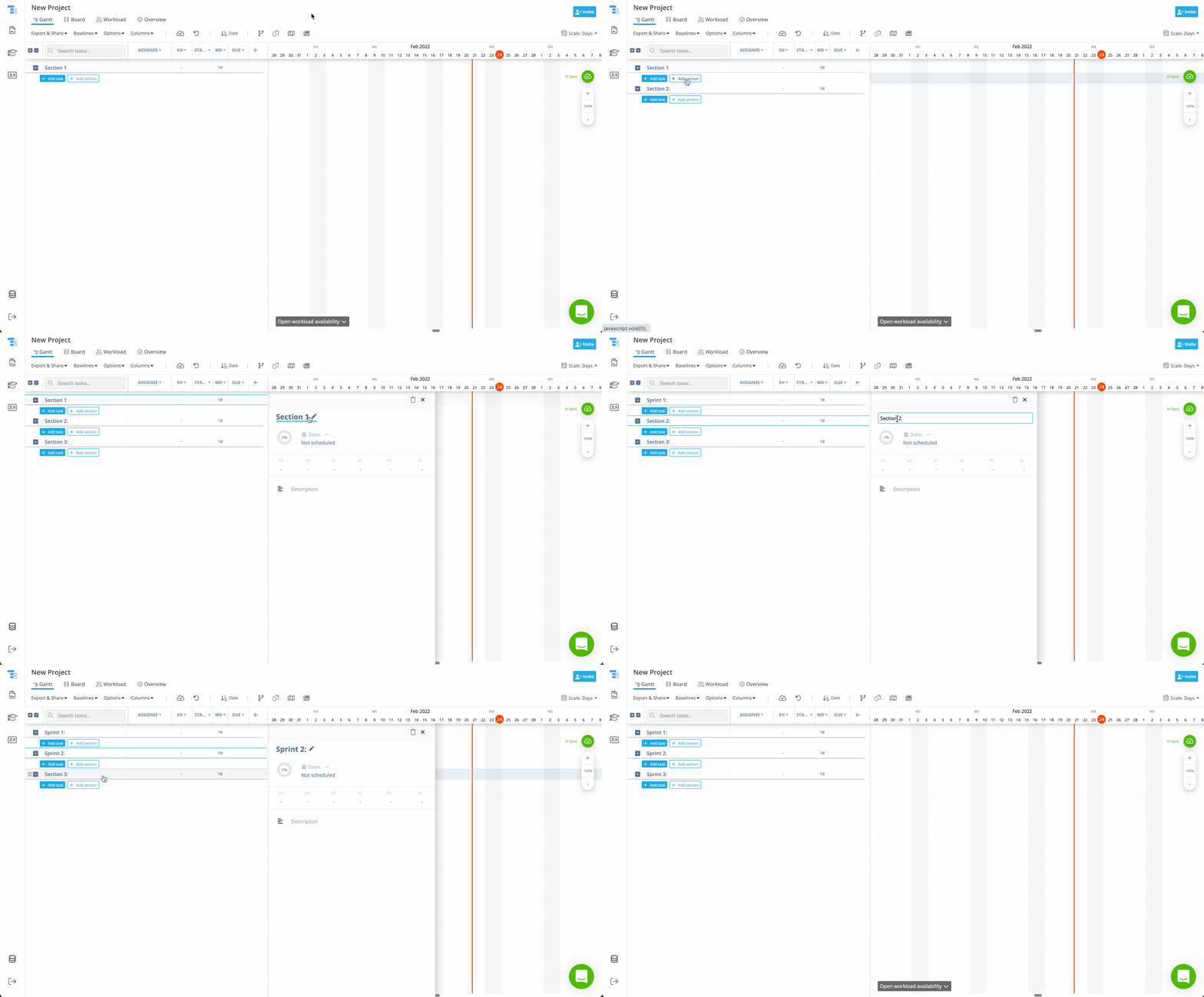
- Open any project in your workbook.
- Click the Add Section button below your existing sections.
- A text box appears instantly in your task list for you to type the name of the new section.
- Press Enter on your keyboard.
- Start adding tasks directly under that section.
This makes it easy to grow your project structure as your project scope expands.
↕️ How to Move and Reorder Sections
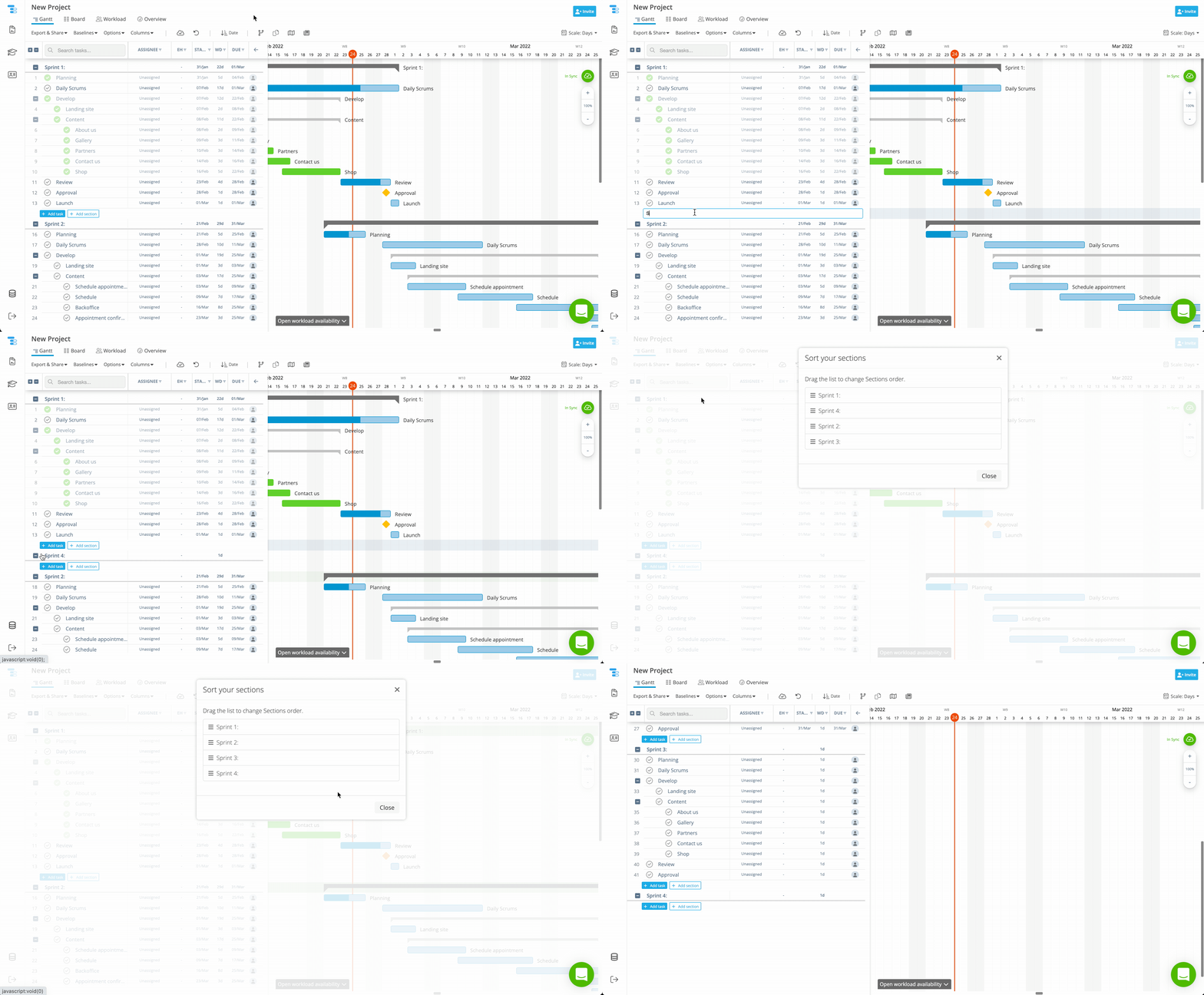
Reordering Sections allows you to match your project timeline with real execution order:
- Hover over the section name
- Click the three-line handle
- On the dialog, drag the section to a new position
- Release to apply the change
- Click Close
This instantly updates the visual order in your Gantt chart, keeping planning, reporting, and execution fully aligned.
👥 Who Can Create and Manage Sections
Every project member in Instagantt can:
- Create Sections
- Move and reorder Sections
- Edit Section names
- Delete Sections (with permanent task deletion)
This collaborative model allows teams to adapt the project structure dynamically as priorities shift — while still requiring responsible data handling.
💡 Managing Sections Safely: Editing, Deleting, and Task Impact
You can rename, reorder, and delete sections at any time. However, deletion requires special attention:
⚠️ CRITICAL WARNING: When you delete a Section, all tasks inside that Section are permanently deleted. DELETED TASKS CAN’T BE RECOVERED.
Best practice before deleting a Section:
- Move important tasks to another Section
- Or create a Public Snapshot for backup
- Or export tasks for backup
- Then proceed with deletion
This ensures you never lose critical project data, work history, or timeline details.
✅ Best Practices for Using Sections in Project Planning
To get the most value from using Sections in your project management workflow:
- Name Sections based on phases, not vague labels
- Keep Section size balanced — avoid overcrowding
- Reorder Sections as the project evolves
- Combine Sections with Folders and Resources for advanced planning
- Always review tasks before deleting a Section
Used properly, Sections turn Instagantt into a scalable online project planning system.
📌 Summary
Sections are foundational to how you organize tasks, structure projects, and manage timelines in Instagantt. They allow you to divide complex projects into phases, sprints, workflows, or client-based groupings. Just remember: deleting a Section permanently deletes its tasks, so always manage Sections with intention.
🚀 Organize Your Projects with Sections in Instagantt
Use Sections to master your project structure. Organize tasks into meaningful phases, improve visibility, and bring clarity to every Gantt chart you build.
❓ Frequently Asked Questions (FAQ)
Can I have multiple Sections in one project?
Yes. You can create as many Sections as needed to organize your project workflow.
Do new projects always start with a Section?
Yes. Every blank project includes a default Section 1, and templates usually include multiple predefined sections.
What happens if I delete a Section?
All tasks inside that Section are deleted permanently and cannot be recovered.
Can I reorder Sections after creating them?
Yes. You can drag and drop Sections at any time to reflect changes in your project timeline.
Who is allowed to manage Sections?
Any project member can create, edit, move, or delete Sections.