Users and Members
A clear understanding of how Users, Subscription Members, and Workbook Members work in Instagantt is essential for managing your team effectively. Many workspace issues—especially around licensing, access, and permissions—stem from confusing these two concepts. This guide explains exactly how they differ, how licenses work, and how to avoid the most common mistakes (like removing people from the wrong place!).
🧭 Table of Contents
- What Are Users in Instagantt?
- Subscription Members (License Holders)
- Workbook Members (Project Collaborators)
- Roles & Permissions: Subscription vs. Workbook
- How Instagantt Licensing Works
- Summary
- Frequently Asked Questions (FAQ)
👤 What Are Users in Instagantt?
A User is anyone who has created an Instagantt account and can log in. Users gain access to features, workbooks, and projects only if they hold a valid license through a subscription.
If a user has an account but is not assigned a license via a subscription (and has passed the 7-day trial), they will not be able to use Instagantt. They’ll see an upgrade screen instead of their workbooks.
🪪 Subscription Members (License Holders)
A Subscription Member is someone who has been added to your paid Instagantt subscription.This is the license level, and it is completely separate from workbook access.
Important facts:
- Adding someone to a subscription uses a license immediately, even if the person hasn’t created their Instagantt account yet.
- Only subscription members can use Instagantt beyond the free trial.
- Subscription Admins and the Subscription Owner can add/remove members from the subscription.
- Removing someone from the subscription instantly removes their license, and they can no longer access any workbook.
Subscription membership = who is paying / who has a seat.Workbook membership = where they can work.
These two levels are completely independent.
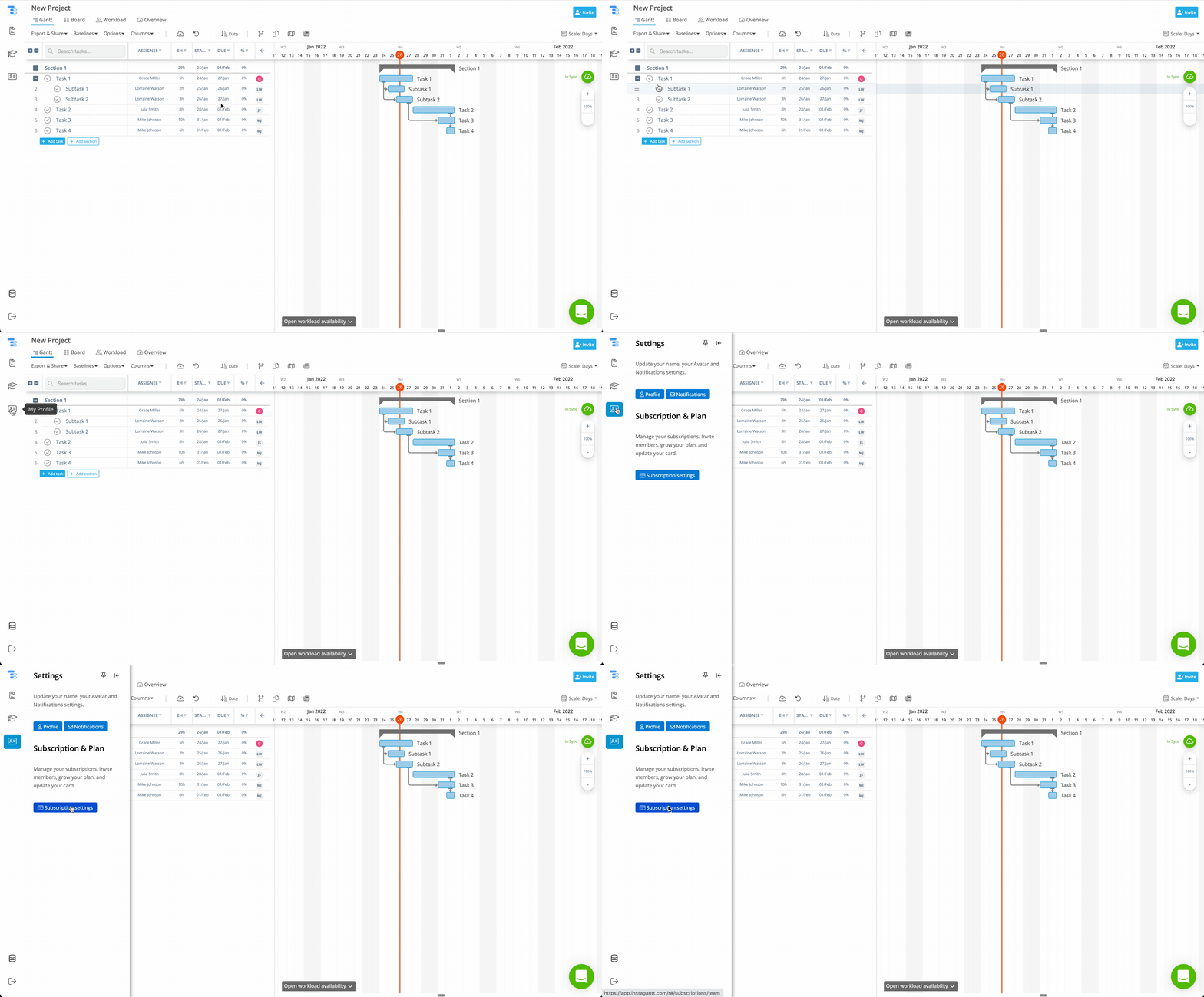
How to access: The Members list of a subscription can be found on "My Profile" -> "Subscription Settings" -> "Members". Only subscription Owners and Admins will have access to this section. Here's how you can get there:
📂 Workbook Members (Project Collaborators)
A Workbook Member is someone who has been invited to collaborate inside a specific workbook.
Key details:
- Every workbook member must also be a subscription member, because editing and viewing require a license.
- Removing someone from a workbook does not remove them from the subscription.
- If you remove a person only from the workbook, they lose access to the projects in that workbook — but they still consume a license.
- Workbook membership determines which projects a user can access, not whether they have a license.
This is the #1 area where people get confused — so we emphasize it throughout this guide.
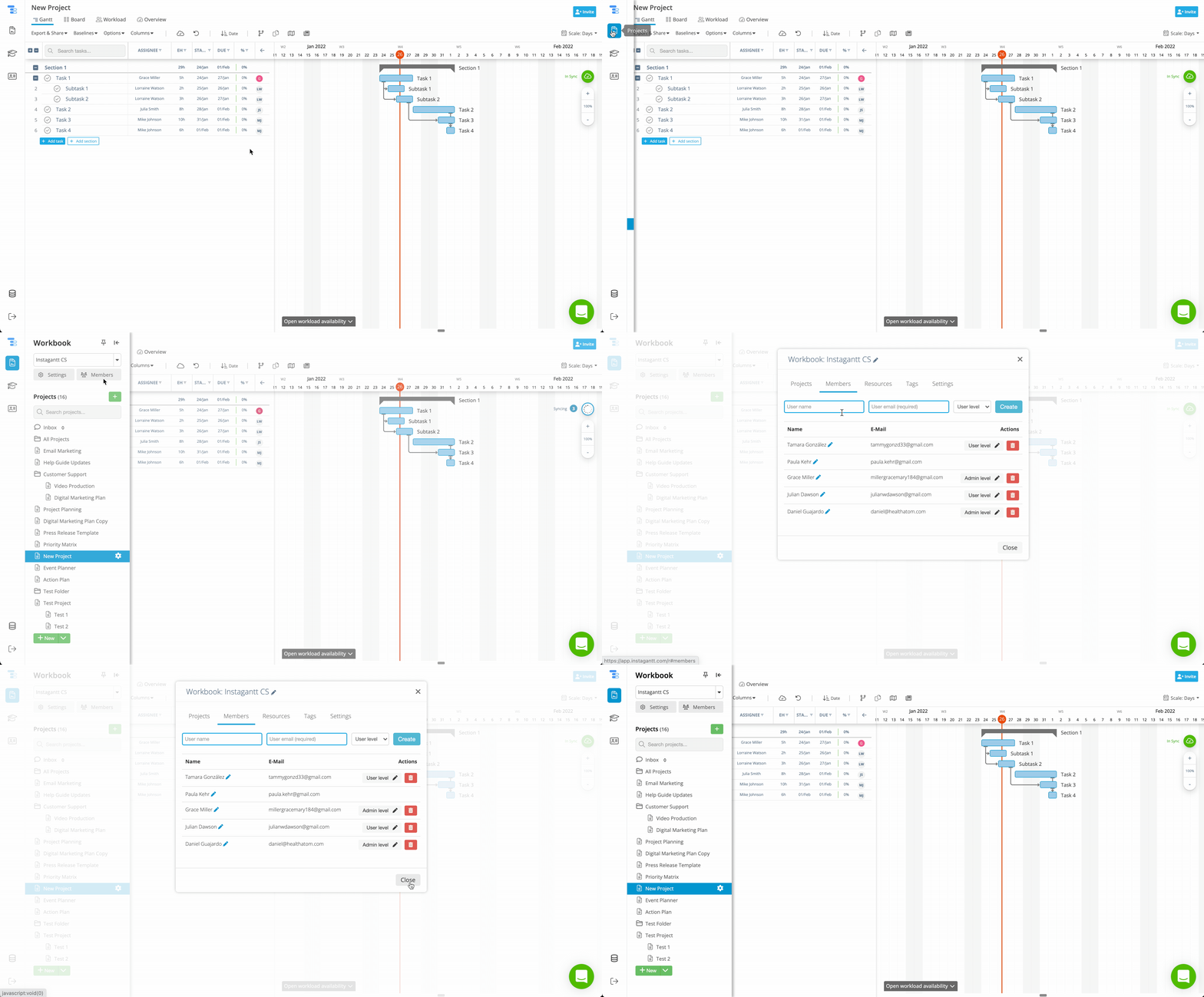
How to access: The Members list of a Workbook can be found on "Projects" -> "Members". Here's how to get there:
🔐 Roles & Permissions: Subscription vs Workbook
Subscription-Level Roles
These roles control billing, licenses, and overall subscription management.
- Owner: Full control of the subscription, billing, and users.
- Admin: Can add/remove users from the subscription and help manage licenses.
- Regular User: Holds a license and can work in any workbook they are added to.
Workbook-Level Roles
These roles apply only within a specific workbook.
- Owner: Has full control of the workbook, its settings, and its members.
- Admin: Can manage members and settings within that workbook.
- User: Regular collaborator with full edit access in the workbook.
A person can have different roles in different workbooks, and their subscription role does not dictate their workbook role.
💳 How Instagantt Licensing Works
To access any workbook—or even create one—a person must hold a subscription license.
Key licensing rules:
- A subscription seat is consumed as soon as someone is added to the subscription.
- If a user is removed from the subscription, they instantly lose access to all workbooks.
- You cannot collaborate across different subscriptions. Everyone inside a workbook must share the same subscription.
- Removing someone from a workbook does not free a license. Removing them from the subscription does.
Think of licenses as access to Instagantt, and workbooks as access to specific content.
📝 Summary
Understanding the difference between subscription membership (who has a license) and workbook membership (who can access projects) is crucial for managing your team effectively. Keeping these levels separate helps prevent access issues, licensing confusion, and accidental loss of project visibility.
🚀 Ready to Manage Your Team with Confidence?
Take control of licenses and workbook access in Instagantt.Review your subscription members and workbook collaborators regularly to keep your workspace clean, organized, and fully optimized for your team.
❓ Frequently Asked Questions (FAQ)
Do all workbook members need a license?
Yes. Every member must belong to the same paid subscription to be able to collaborate. For the avoidance of doubt, members of different subscriptions can't collaborate on the same workbook.
If I remove someone from a workbook, do I free a license?
No. You'll need to remove them from the subscription to free a license.
Can users have different roles in different workbooks?
Yes. Subscriptions and workbooks are independent, so a single user could have different roles in workbooks and in the subscription.
Why does Instagantt ask me to add an extra license if I already removed the member from the workbook?
Because they are still part of the subscription (holding a license), you'll need to click My Profile -> Subscription Settings -> Members and remove the member from the subscription to replace them with a new member.
Can two people from separate subscriptions collaborate on the same workbook?
No. They must belong to the same subscription.
Does removing someone from the subscription remove them from all workbooks?
No, the users will remain as members of the workbook unless the owner or an admin removes them, however, without a license from the original subscription they won't be able to access the projects saved on that workbook.