Top 10 Gantt Chart Software for Project Management in 2026
An honest, in-depth comparison of the best Gantt chart tools available today






Why the Right Gantt Chart Software Matters
Choosing the right Gantt chart software is one of the most impactful decisions a project manager can make. The wrong tool slows your team down with clunky interfaces, missing features, and painful workarounds. The right tool accelerates planning, improves communication, and gives your team a shared visual language for project execution.
In 2026, the Gantt chart software landscape is more competitive than ever. Cloud-based tools have replaced desktop applications, AI-powered features are becoming standard, and integrations with tools like Asana, Jira, and Slack are essential. The best tools combine powerful scheduling features with intuitive design that does not require a training course to use.
This guide evaluates the top ten Gantt chart tools based on core scheduling features, ease of use, collaboration capabilities, integration ecosystem, pricing, and value for money. Whether you are a solo project manager or leading a team of fifty, there is a tool on this list that fits your needs.
1. Instagantt — Best Overall Gantt Chart Software
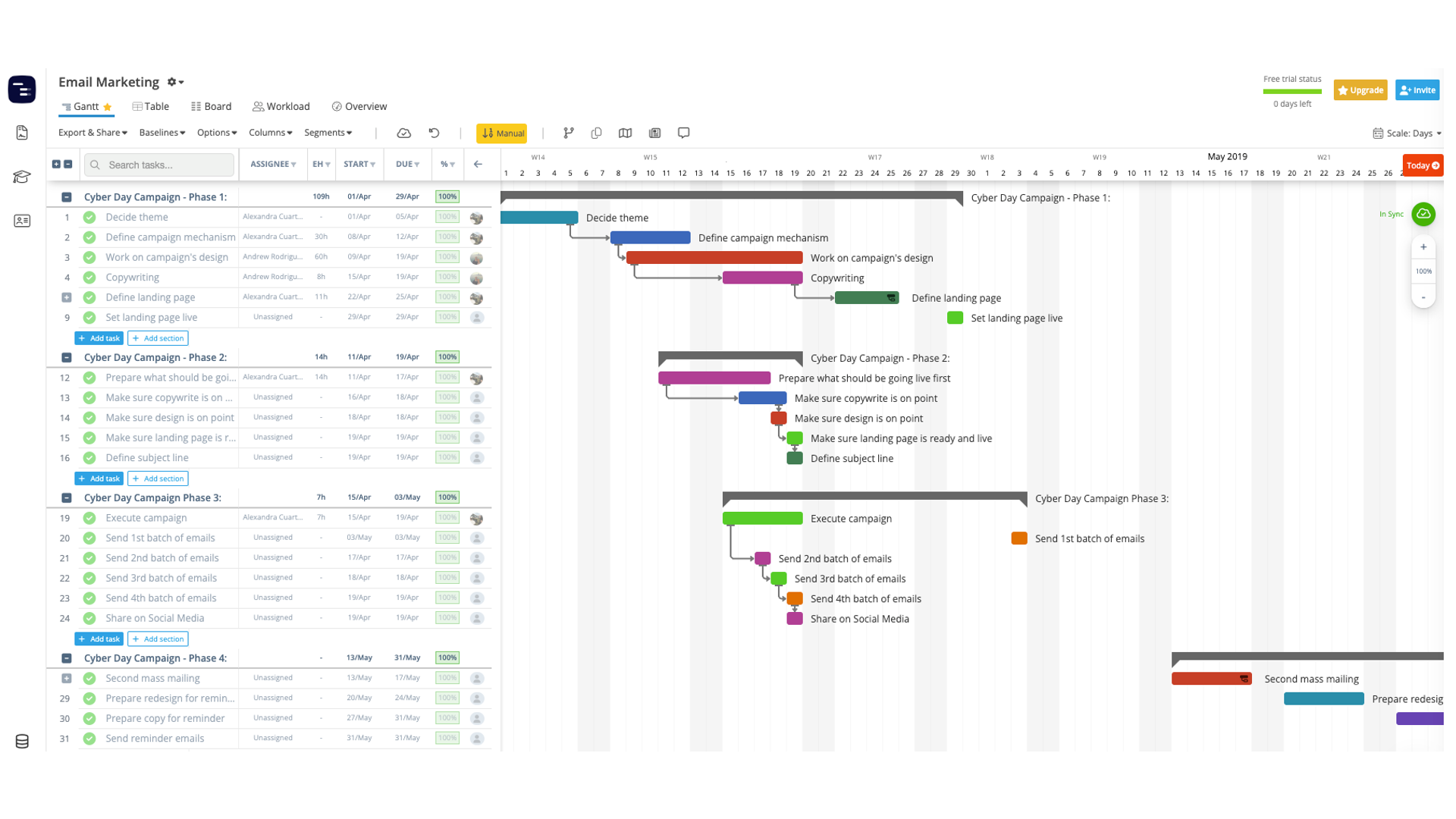
Instagantt leads this list for good reason: it delivers the deepest Gantt chart functionality in the most intuitive package. Built exclusively around the Gantt chart paradigm, every feature is designed to make timeline-based project planning effortless. Unlike general-purpose project management tools that bolt on a Gantt view as an afterthought, Instagantt treats the Gantt chart as the primary interface.
Key strengths include drag-and-drop task scheduling, all four dependency types (Finish-to-Start, Start-to-Start, Finish-to-Finish, Start-to-Finish), critical path highlighting, baseline comparisons, and a workload view that prevents resource overallocation. The Gantt timeline is fully interactive: dragging a task bar automatically reschedules all dependent downstream tasks, and dependency arrows are drawn visually so the project flow is immediately clear. Milestones, subtasks, and task grouping create hierarchical plans that can be expanded or collapsed to control the level of detail visible at any moment.
The AI Assistant is a standout feature that sets Instagantt apart from every competitor. By describing your project in natural language — for example, 'Plan a mobile app launch with design, development, testing, and marketing phases over six months' — the AI generates a complete project structure with tasks, subtasks, duration estimates, dependency chains, and milestones. This capability saves hours of manual setup and is especially valuable for project managers who create similar project structures repeatedly across clients or departments.
Instagantt's two-way Asana integration is unmatched in the market. Teams already using Asana can overlay Gantt chart capabilities on their existing projects without migrating data. Changes sync bidirectionally in real time, so both tools always reflect the latest plan. Tasks created in Asana appear in Instagantt automatically, and timeline adjustments in Instagantt push back to Asana without delay. No other Gantt chart tool offers this level of integration with a major project management platform.
Pricing starts at just twelve dollars per month for individuals and twenty-four dollars per month for teams, including three collaborators. A free plan supports up to three Asana projects, giving teams a risk-free way to evaluate the tool with real project data. Compared to enterprise tools like Microsoft Project and Smartsheet, Instagantt delivers comparable scheduling power at a fraction of the cost.
2. Microsoft Project — Best for Enterprise and Legacy Workflows
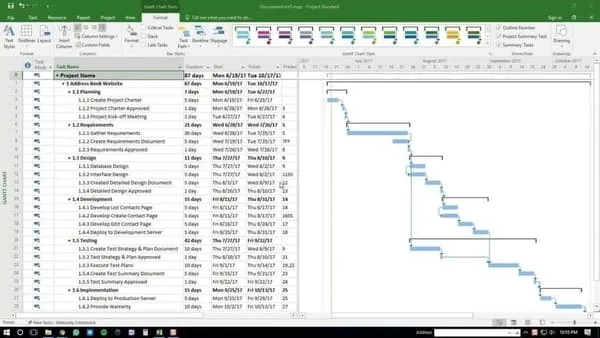
Microsoft Project has been the enterprise standard for decades and remains a powerful choice for large organizations with complex project portfolios. Its scheduling engine is the most sophisticated on this list, supporting advanced features like resource leveling, earned value management, what-if scenario analysis, and multi-project portfolio management with cross-project dependency tracking.
The reporting capabilities are extensive, with pre-built reports for resource utilization, cost tracking, burndown analysis, and milestone status. Integration with Power BI enables custom dashboards that pull live data from project plans, giving executives portfolio-level visibility without accessing the tool directly. For organizations that need to track time and costs at a granular level, Microsoft Project's earned value management features provide unmatched financial oversight.
The main drawback is complexity. Microsoft Project has a steep learning curve and an interface that can feel overwhelming for teams that do not need its full feature set. Training costs should be factored into the total investment, as most users require formal instruction to use the tool effectively. Pricing is also significantly higher than cloud-native alternatives, starting at around thirty dollars per user per month for the cloud version, with additional costs for the desktop application.
Microsoft Project is best suited for organizations already invested in the Microsoft ecosystem that need enterprise-grade reporting, compliance features, and integration with Microsoft 365 tools like Teams, SharePoint, and Power BI. For smaller teams and straightforward projects, tools like Instagantt deliver better value with significantly less overhead and learning time.
3. TeamGantt — Best for Simple Team Collaboration
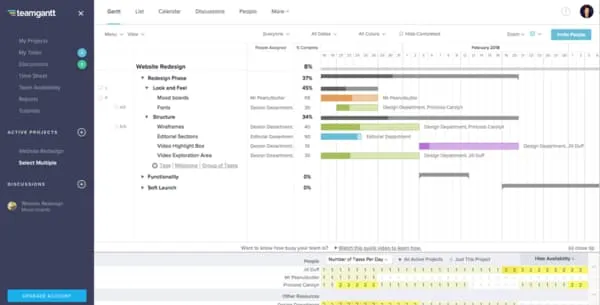
TeamGantt positions itself as a friendly, approachable Gantt chart tool for teams that want simplicity without sacrificing visual project planning. Its drag-and-drop interface is clean and modern, and the learning curve is minimal. Teams can get started within minutes without watching tutorial videos or attending training sessions.
The collaboration features are solid, with real-time updates, task comments, and file attachments that keep project communication centralized. TeamGantt also offers a unique availability management feature that helps managers see who has capacity before assigning new work, preventing the common problem of overloading top performers while other team members have idle capacity.
The portfolio view allows managers to see all active projects on a single timeline, which is valuable for organizations juggling multiple concurrent initiatives. Color coding by project, assignee, or status creates instant visual clarity across the portfolio.
However, TeamGantt lacks some advanced features that power users expect, such as critical path analysis, baseline comparisons, workload heatmaps, and automated rescheduling when dependencies shift. It also does not offer an AI assistant for automated project generation. For teams that need deeper planning capabilities and intelligent automation, Instagantt offers a more complete feature set at a similar price point.
4. GanttPRO — Best for Traditional Gantt Chart Purists
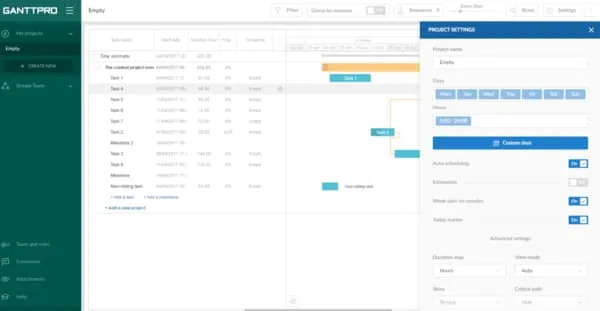
GanttPRO delivers a polished Gantt chart experience with strong scheduling features including auto-scheduling, resource management, cost tracking, and time logging. The interface is clean and focused, with the Gantt chart always front and center. For project managers who want a tool that nails the Gantt paradigm without the distractions of unrelated features, GanttPRO is a strong contender.
One of GanttPRO's strengths is its template library, which includes pre-built project plans for common use cases like software development, construction, marketing campaigns, and event planning. This helps new users get started quickly with industry-relevant structures rather than building plans from scratch. The auto-scheduling feature automatically adjusts dependent tasks when predecessor tasks change, reducing manual rescheduling effort.
The cost tracking module allows managers to assign hourly rates or fixed costs to tasks and resources, with the tool calculating budget forecasts automatically. This is particularly valuable for agencies and consultancies that need to track project profitability alongside schedule performance.
The pricing model is competitive, with per-user plans starting around seven dollars and fifty cents per month on annual billing. However, some key features like resource management, advanced exports, and time tracking integrations are only available on higher-tier plans, which can push the effective cost higher for teams that need full functionality.
5. Monday.com — Best for Visual Project Management Beyond Gantt
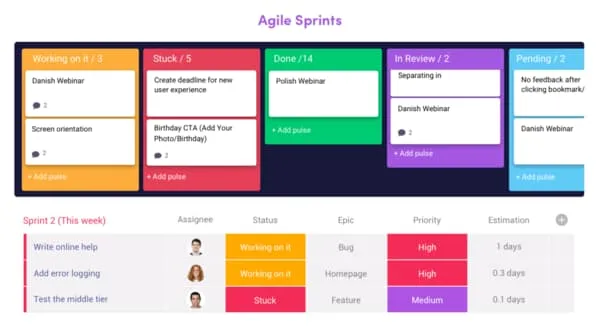
Monday.com is a popular work operating system that includes Gantt chart views as one of many visualization options. Its strength lies in versatility: the same data can be viewed as a Gantt chart, kanban board, calendar, timeline, map, or dashboard, giving teams multiple perspectives on their work without duplicating information.
The platform excels at automation workflows, with no-code rules that can automatically assign tasks based on column values, send notifications when deadlines approach, move items between groups based on status changes, and trigger actions in connected third-party tools. The automation library includes hundreds of pre-built recipes that teams can deploy without any technical knowledge.
Monday.com's dashboard feature is one of the best in the market, allowing teams to create visual summaries that pull data from multiple boards. This cross-board reporting is valuable for organizations that separate projects by department but need unified visibility at the executive level.
The Gantt chart view in Monday.com, while functional, is not as feature-rich as dedicated Gantt tools. Advanced dependency management with all four relationship types, critical path analysis, baseline comparisons, and workload balancing are either limited or require higher-tier plans. Teams that need a Gantt-first experience may find Monday.com's approach too general, with the Gantt view feeling like one of many features rather than the core experience.
6. ClickUp — Best Free Gantt Chart Option
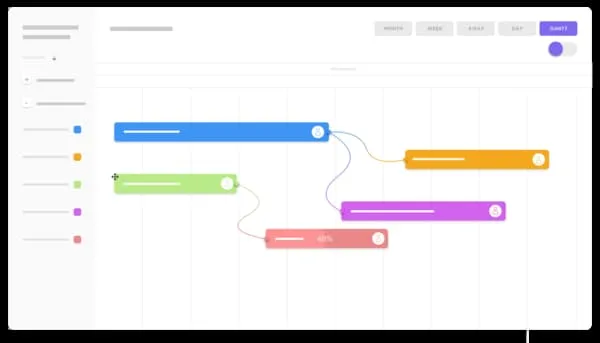
ClickUp offers a comprehensive project management suite with a Gantt view included even on its free plan. The breadth of features is impressive, covering docs, whiteboards, goals, time tracking, mind maps, and chat alongside traditional project management views. For budget-conscious teams, ClickUp delivers significant functionality at no cost.
The Gantt view in ClickUp supports task dependencies, progress tracking, and color-coded priorities. On paid plans, the Gantt view gains rescheduling capabilities and critical path visualization. The free plan, however, limits Gantt view usage to one hundred uses, making it best for occasional project visualization rather than daily planning.
ClickUp's unique advantage is its customizable nature. Virtually every aspect of the interface can be configured, from custom fields and statuses to views and automations. This flexibility means teams can build workflows that match their exact processes, but it also means significant setup time is required to get the most from the tool.
However, the sheer number of features can make the interface feel cluttered and overwhelming. New users often report a steep learning curve as they navigate the many options and configure the workspace. Performance can also suffer with large workspaces, as the breadth of features demands significant computing resources. ClickUp is best for teams that want an all-in-one workspace rather than a focused Gantt chart experience.
7. Smartsheet — Best for Spreadsheet Users
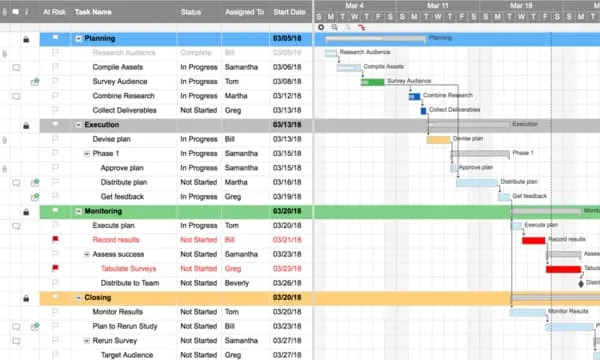
Smartsheet combines spreadsheet familiarity with Gantt chart capabilities, making it an excellent choice for teams transitioning from Excel. Its grid-based interface feels natural to anyone who has worked with spreadsheets, while adding project management features like dependencies, automated workflows, resource management, and baseline tracking on top.
One of Smartsheet's key advantages is its flexibility for non-project-management use cases. Teams use Smartsheet for asset tracking, budget management, CRM workflows, and compliance documentation alongside project scheduling. The cell-level formula support rivals Excel, allowing complex calculations and cross-sheet references that power dynamic dashboards.
Resource management and reporting features are strong, with the Resource Management add-on providing detailed capacity planning and utilization reports. The platform supports complex formulas, conditional formatting, and automated approval workflows. However, the Gantt view can feel like a secondary feature rather than the primary interface, and the per-user pricing model starting around fourteen dollars per month can become expensive for larger teams.
8. Wrike — Best for Creative and Cross-Department Teams
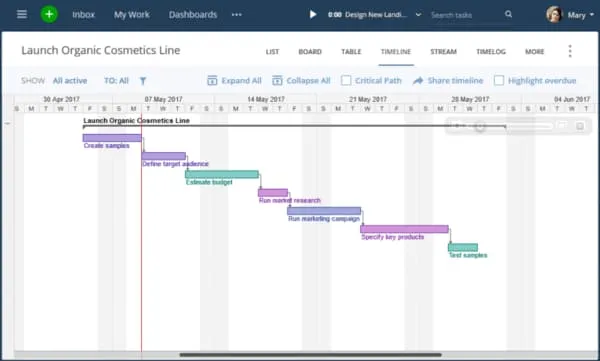
Wrike provides enterprise-grade project management with Gantt charts, resource planning, and proofing workflows designed for creative teams. Its strength lies in cross-departmental visibility, with features that help marketing, design, development, and operations teams collaborate on shared timelines without stepping on each other's work.
The platform includes built-in proofing and approval workflows for creative assets, which is unique among Gantt chart tools. Designers can upload images, PDFs, and videos for review, and stakeholders can annotate directly on the assets with pinpointed feedback. This eliminates the back-and-forth of email-based review cycles and keeps all feedback attached to the relevant task.
Wrike's request forms allow teams to standardize how work enters their pipeline, automatically creating tasks with the correct structure, assignees, and dependencies based on form responses. Combined with blueprints — reusable project templates — this creates an efficient intake-to-execution workflow. However, pricing escalates quickly for larger teams, especially with add-ons for resource management and advanced analytics, and the complexity of the platform may be excessive for teams with straightforward scheduling needs.
9. ProofHub — Best for Flat-Rate Team Management
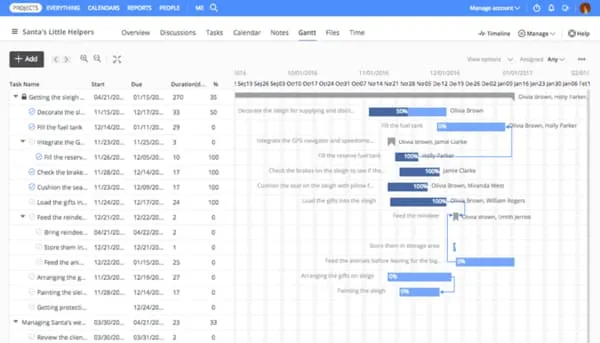
ProofHub offers a flat-rate pricing model that includes Gantt charts, kanban boards, time tracking, file proofing, discussions, and notes in a single package. The flat pricing starting at forty-five dollars per month regardless of user count is attractive for growing teams since costs do not increase as you add users, making budget planning predictable and eliminating the per-seat anxiety that plagues other tools.
The Gantt chart view is straightforward and includes basic dependency management, milestones, and task grouping. Color-coded task bars, progress percentages, and a clean visual layout make project status clear at a glance. While it lacks advanced features like critical path analysis, workload heatmaps, and AI-assisted planning, ProofHub's simplicity is a strength for teams that need basic visual scheduling without the complexity of enterprise tools.
ProofHub also includes built-in chat, discussion topics, and file proofing, reducing the need for external communication tools. For small to mid-size teams that want a single platform covering project management, communication, and file review, ProofHub's all-in-one approach and flat pricing make it a compelling value proposition.
10. Toggl Plan — Best for Visual Timeline Simplicity
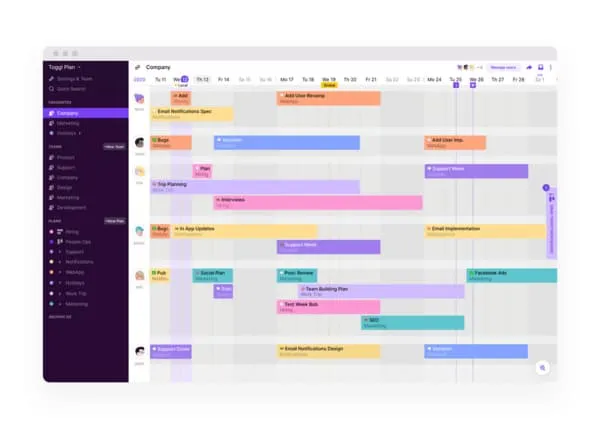
Toggl Plan (formerly Teamweek) takes a minimalist approach to visual project planning. Its drag-and-drop timeline interface is clean and intuitive, designed for teams that want simplicity above all else. Color-coded task bars, team swimlanes, and milestone markers create a clear visual schedule without overwhelming options or complex configuration requirements.
The team timeline view is Toggl Plan's signature feature, showing each team member's schedule on horizontal swimlanes. Managers can see at a glance who is working on what, spot gaps in the schedule, and drag tasks between people to balance workload. This visual simplicity makes it ideal for creative agencies, small development teams, and consulting firms that need to see team availability quickly.
The tool integrates with Toggl Track for time tracking, creating a seamless workflow from planning to execution and enabling comparison of estimated versus actual time spent. However, Toggl Plan lacks advanced Gantt chart features like dependency management, critical path analysis, baseline comparisons, and resource workload analytics. It is best suited for small teams with straightforward projects that need a quick visual overview rather than detailed scheduling and sophisticated timeline management.
Emerging Trends in Gantt Chart Software for 2026
The Gantt chart software market is evolving rapidly, driven by three major trends that are reshaping how teams plan and execute projects. Understanding these trends helps you choose a tool that will remain relevant and valuable in the years ahead.
First, artificial intelligence is transforming project planning from a manual exercise into an assisted one. Tools like Instagantt already offer AI-powered project generation that creates complete plan structures from natural language descriptions. In the coming months, expect AI to expand into risk prediction, schedule optimization, and automatic resource balancing. Early adopters of AI-enhanced Gantt tools gain a competitive advantage through faster planning cycles and more realistic schedules.
Second, hybrid work models have made real-time collaboration and asynchronous communication essential features rather than nice-to-haves. Gantt chart tools must now support distributed teams across time zones, with features like public snapshot sharing, async task comments, automated status notifications, and mobile access. Tools that still rely on desktop-only interfaces or synchronous workflows are falling behind.
Third, integration ecosystems are becoming the primary differentiator between mid-tier and top-tier tools. Project managers in 2026 expect their Gantt chart tool to connect seamlessly with their existing stack — task management in Asana or Jira, communication in Slack or Teams, documentation in Notion or Confluence, and reporting in Power BI or Tableau. The depth and reliability of these integrations matters more than the sheer number of supported connections.
Feature Comparison: What to Look For in 2026
When comparing Gantt chart software, evaluate core scheduling capabilities first. Every tool should support task creation, duration setting, and date assignment. Beyond the basics, look for all four dependency types (Finish-to-Start, Start-to-Start, Finish-to-Finish, Start-to-Finish), automatic rescheduling when predecessors move, and critical path highlighting that shows which tasks directly impact your project deadline.
Resource management is the second most important capability for teams. The best tools show each team member's workload across all projects, highlight overallocation with visual indicators, and allow drag-and-drop reassignment. Without workload visibility, managers cannot prevent burnout or optimize team productivity. Instagantt, Microsoft Project, Smartsheet, and Wrike all offer strong resource management, while simpler tools like TeamGantt and Toggl Plan provide only basic assignment features.
Collaboration features separate modern Gantt chart tools from legacy desktop applications. Look for real-time editing, task-level comments, file attachments, notifications, and shareable read-only views. In 2026, remote and hybrid teams depend on these features to stay aligned. Public snapshots and embeddable views are particularly valuable for stakeholder communication without granting full project access.
AI-powered features are becoming a significant differentiator. Instagantt's AI Assistant can generate complete project plans from natural language descriptions, including tasks, dependencies, milestones, and duration estimates. This capability saves hours of manual planning and is especially valuable for project managers who create similar project structures repeatedly. As of 2026, most competitors have not yet matched this capability.
Pricing Comparison Across All 10 Tools
Pricing models vary significantly across Gantt chart tools. Instagantt offers one of the most straightforward and affordable structures: free for up to three Asana projects, twelve dollars per month for unlimited individual use, and twenty-four dollars per month for teams including three collaborators. This makes it accessible to freelancers, small businesses, and growing teams alike.
At the enterprise end, Microsoft Project starts at around thirty dollars per user per month for the cloud version, with additional costs for the desktop application. Smartsheet charges per user starting at around fourteen dollars per month. Wrike and Monday.com both use tiered pricing models where per-user costs decrease with higher tiers but minimum seat requirements can push total costs higher than expected.
ClickUp stands out by offering a generous free plan, but teams that need advanced features like custom fields, Gantt dependencies, and advanced reporting must upgrade to paid tiers starting at seven dollars per user per month. GanttPRO and TeamGantt fall in the mid-range at seven to ten dollars per user. ProofHub's flat-rate model at forty-five to eighty-nine dollars per month regardless of user count can be a bargain for larger teams. Toggl Plan starts at eight dollars per user per month for its team plan.
When evaluating pricing, look beyond the monthly per-user number. Consider which features are locked behind higher tiers, whether there are minimum seat requirements, and whether annual billing offers meaningful savings. The cheapest option per user is not always the best value if critical features require expensive upgrades.
How to Choose the Right Gantt Chart Software
Start by defining your core requirements. Do you need a dedicated Gantt chart tool or a general project management platform with Gantt views? Teams focused on timeline planning and scheduling get more value from dedicated tools like Instagantt. Teams needing kanban boards, documents, and chat alongside their Gantt charts might prefer a platform like Monday.com or ClickUp.
Consider your team size and collaboration needs. Solo project managers and freelancers can often get excellent results from individual plans on tools like Instagantt or GanttPRO. Teams of three to ten people need solid collaboration features, real-time editing, and workload views. Larger organizations of fifty or more users may need enterprise features like SSO, audit trails, advanced permissions, and portfolio management that tools like Microsoft Project and Wrike specialize in.
Integration requirements should weigh heavily in your decision. If your team uses Asana, Instagantt's bidirectional sync is a major advantage that no competitor matches. If you are in the Microsoft ecosystem, Microsoft Project integrates naturally with Teams, SharePoint, and Power BI. Evaluate how the Gantt tool fits into your existing workflow rather than forcing your team to adopt an entirely new ecosystem.
Finally, prioritize usability above feature count. The best features in the world are useless if your team will not adopt the tool. Look for intuitive drag-and-drop interfaces, clean visual design, and a gentle learning curve. Most tools offer free trials, so test two or three options with real project data before committing. The tool that your team actually uses consistently will deliver far more value than the tool with the longest feature list that sits unused.
Final Verdict: Our Top Recommendation
After evaluating all ten tools across scheduling depth, usability, collaboration, integrations, and pricing, Instagantt stands out as the best overall Gantt chart software for 2026. It strikes the ideal balance between powerful features and an intuitive interface that teams can adopt without extensive training. The AI Assistant for project generation, bidirectional Asana integration, and affordable pricing create a value proposition that no other tool matches across all evaluation criteria.
For enterprise teams with established Microsoft infrastructure and complex portfolio management needs, Microsoft Project remains a strong choice despite its higher cost and steeper learning curve. For teams that need Gantt views alongside kanban, docs, and other project views, Monday.com and ClickUp offer the broadest feature sets. For spreadsheet-oriented teams, Smartsheet bridges the gap between familiar grid interfaces and modern project management.
The most important step is to test your top two or three choices with a real project. Abstract feature comparisons only tell part of the story — the tool that feels right when you are building an actual project plan, dragging tasks, setting dependencies, and sharing with stakeholders is the tool you should commit to. Start with Instagantt's free plan to experience Gantt-first project management, and compare it against the alternatives before making your decision.